

Documentation Index
Fetch the complete documentation index at: https://allhandsai-update-cli-docs-new-features.mintlify.app/llms.txt
Use this file to discover all available pages before exploring further.
Obtain Your OpenHands LLM API Key
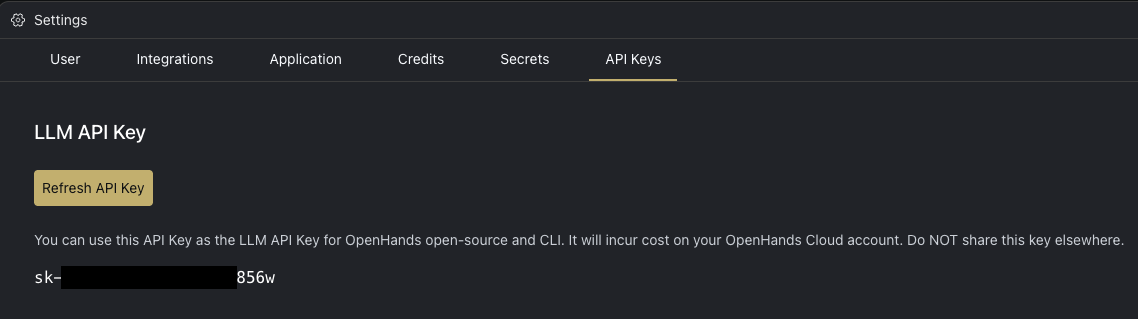
- Log in to OpenHands Cloud.
- Go to the Settings page and navigate to the
API Keystab. - Copy your
LLM API Key.
Configuration
When running OpenHands, you’ll need to set the following in the OpenHands UI through the Settings under theLLM tab:
LLM ProvidertoOpenHandsLLM Modelto the model you will be using (e.g. claude-sonnet-4-20250514 or claude-sonnet-4-5-20250929)API Keyto your OpenHands LLM API key copied from above
Using OpenHands LLM Provider in the CLI
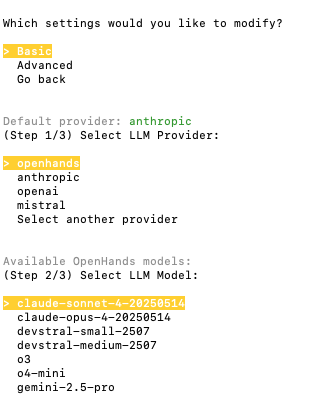
- Run OpenHands CLI.
- To select OpenHands as the LLM provider:
- If this is your first time running the CLI, choose
openhandsand then select the model that you would like to use. - If you have previously run the CLI, run the
/settingscommand and select to modify theBasicsettings. Then chooseopenhandsand finally the model.
When you use OpenHands as an LLM provider in the CLI, we may collect minimal usage metadata and send it to All Hands AI. For details, see our Privacy Policy: https://openhands.dev/privacy
Using OpenHands LLM Provider with the SDK
You can use your OpenHands API key with the OpenHands SDK to build custom agents and automation pipelines.Configuration
The SDK automatically configures the correct API endpoint when you use theopenhands/ model prefix. Simply set two environment variables:
Example
openhands/ prefix tells the SDK to automatically route requests to the OpenHands LLM proxy—no need to manually set a base URL.
Available Models
When using the SDK, prefix any model from the pricing table below withopenhands/:
openhands/claude-sonnet-4-20250514openhands/claude-sonnet-4-5-20250929openhands/claude-opus-4-20250514openhands/gpt-5-2025-08-07- etc.
If your network has firewall restrictions, ensure the
all-hands.dev domain is allowed. The SDK connects to llm-proxy.app.all-hands.dev.Pricing
Pricing follows official API provider rates. Below are the current pricing details for OpenHands models:| Model | Input Cost (per 1M tokens) | Cached Input Cost (per 1M tokens) | Output Cost (per 1M tokens) | Max Input Tokens | Max Output Tokens |
|---|---|---|---|---|---|
| claude-sonnet-4-5-20250929 | $3.00 | $0.30 | $15.00 | 200,000 | 64,000 |
| claude-sonnet-4-20250514 | $3.00 | $0.30 | $15.00 | 1,000,000 | 64,000 |
| claude-opus-4-20250514 | $15.00 | $1.50 | $75.00 | 200,000 | 32,000 |
| claude-opus-4-1-20250805 | $15.00 | $1.50 | $75.00 | 200,000 | 32,000 |
| claude-haiku-4-5-20251001 | $1.00 | $0.10 | $5.00 | 200,000 | 64,000 |
| gpt-5-codex | $1.25 | $0.125 | $10.00 | 272,000 | 128,000 |
| gpt-5-2025-08-07 | $1.25 | $0.125 | $10.00 | 272,000 | 128,000 |
| gpt-5-mini-2025-08-07 | $0.25 | $0.025 | $2.00 | 272,000 | 128,000 |
| devstral-medium-2507 | $0.40 | N/A | $2.00 | 128,000 | 128,000 |
| devstral-small-2507 | $0.10 | N/A | $0.30 | 128,000 | 128,000 |
| o3 | $2.00 | $0.50 | $8.00 | 200,000 | 100,000 |
| o4-mini | $1.10 | $0.275 | $4.40 | 200,000 | 100,000 |
| gemini-3-pro-preview | $2.00 | $0.20 | $12.00 | 1,048,576 | 65,535 |
| kimi-k2-0711-preview | $0.60 | $0.15 | $2.50 | 131,072 | 131,072 |
| qwen3-coder-480b | $0.40 | N/A | $1.60 | N/A | N/A |